
Unlock the AI Optimization Layer
Standard translation replaces words. MultiLipi LLM Optimization re-engineers your content for the AI age. By enabling this feature, you activate a "Smart Layer" that optimizes your translations for Cultural Relevance, Contextual Accuracy, and Generative Engine Optimization (GEO).
This feature ensures your multilingual site is not just readable by humans, but structurally optimized for discovery by AI agents like ChatGPT, Gemini, and SearchGPT.
Activates smart context retention for natural translations
Injects localized schema signals for better rankings
Enables premium-tier translation models
📌 Two Ways to Enable: Choose based on whether you're setting up a new project or upgrading an existing one.
Method 1: During New Project Setup
When you are adding a new website to MultiLipi, you can enable LLM Optimization directly in the onboarding flow to ensure your very first crawl is AI-ready.
Start the "Add Project" Flow
Enter your website URL and move to Step 2: Configure your Language.
Select Target Languages & Industry
- Choose the languages you want to translate into (e.g., French, German).
- Select your specific Industry (e.g., SaaS, E-commerce) to help the AI understand your domain terminology.
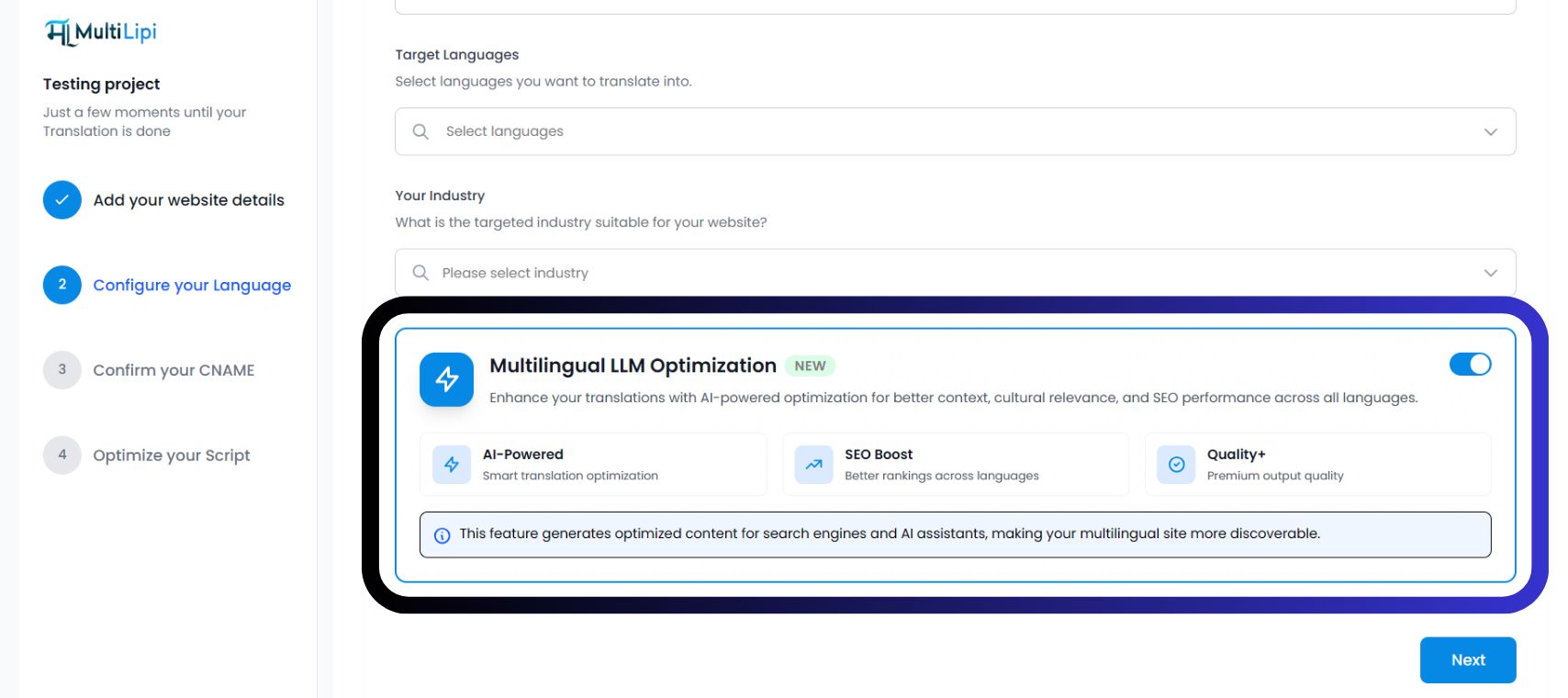
Toggle "Multilingual LLM Optimization"
Locate the Blue Optimization Card. Switch the toggle to ON (Blue).
You will see three active confirmation badges:
Click "Next"
Proceed to confirm your CNAME and optimize your script. Your project will launch with GEO features active from Day 1.
Method 2: For Existing Projects
If you have already integrated MultiLipi, you can activate LLM Optimization at any time from your project settings.
- 1Access Project DashboardLog in to MultiLipi and select your active project from the sidebar.
- 2Navigate to SetupIn the left-hand menu, click on Settings and then select Setup.
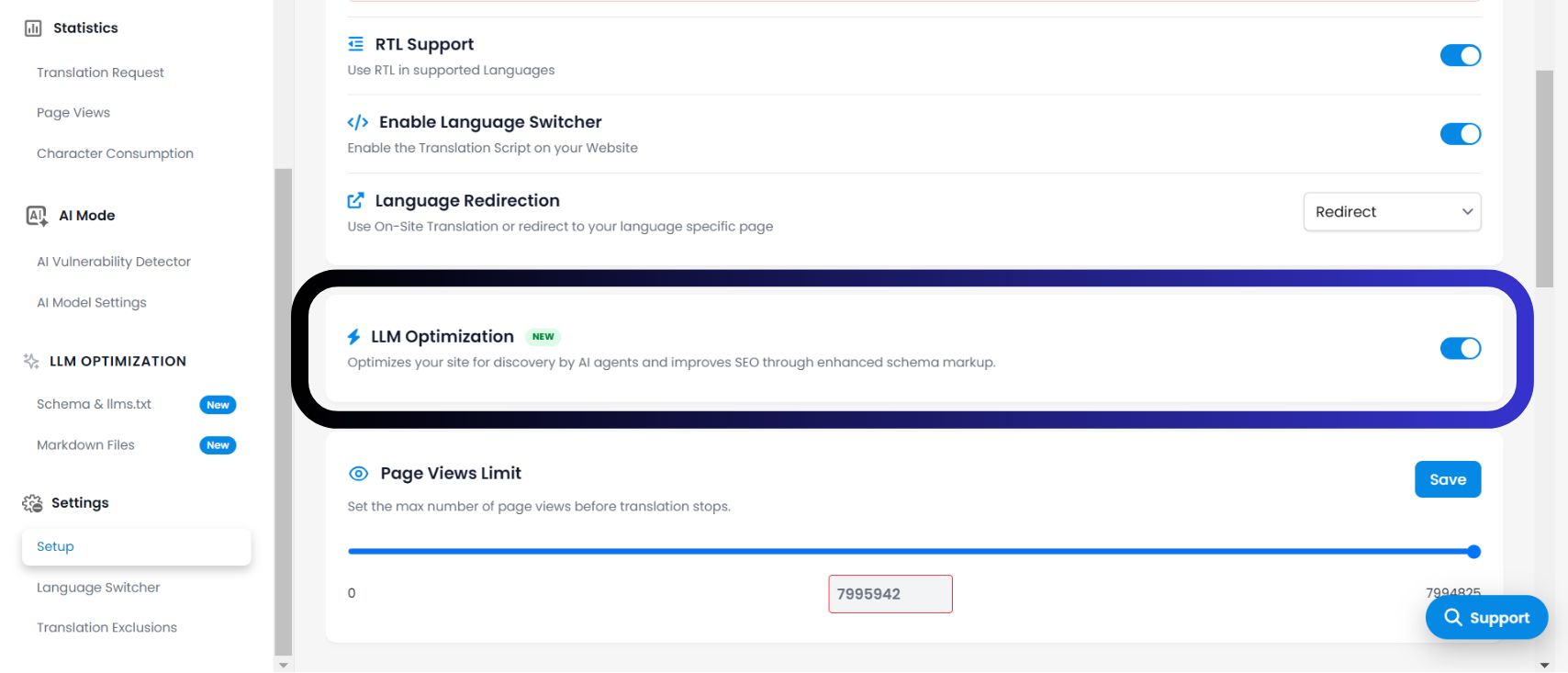
- 3Locate the Optimization ToggleScroll down past "Language Redirection" to the LLM Optimization section. Action: Switch the toggle to ON.
- 4Save ChangesThe system will immediately begin injecting AI-optimized signals into your translation layer. You will now see a new LLM OPTIMIZATION section appear in your sidebar.
Why Enable This?
According to the infrastructure shown in your dashboard, enabling this feature unlocks three critical advantages:
1. AI-Powered Context (Smart Translation)
Unlike basic translation, this mode understands "Cultural Context." It adapts idioms, metaphors, and tone to fit the target market, preventing robotic or awkward phrasing that hurts user trust.
2. SEO Boost (Rankings Across Languages)
It optimizes your content structure for Discovery. It ensures search engines (like Google) and AI Answer Engines (like Perplexity) can index your translated pages accurately, improving your rankings in local SERPs.
3. Quality+ (Premium Output)
This mode forces the engine to use our highest-fidelity translation models. It prioritizes accuracy and fluency over speed, ensuring your brand voice remains consistent across 100+ languages.
How to Verify Activation
✅ Did the infrastructure update?
Once you enable the LLM Optimization toggle, your dashboard interface will evolve immediately. Look for the following indicators to confirm the system is active:
A dedicated section titled LLM OPTIMIZATION will appear in your left-hand navigation bar.
In your project overview, you may see "AI-Powered" or "SEO Boost" badges next to your language list.
Unlocked Features
🎁 What do I get by turning this on?
Enabling this feature is not just a setting; it unblocks a suite of advanced "Generative Engine Optimization" tools that are otherwise hidden. By switching this ON, you gain access to: