

The "Translation Script" is the executable agent that delivers your localized content. By default, MultiLipi injects this agent immediately upon setup to ensure rapid deployment. However, you maintain absolute control over this stream. You can toggle the Enable Script switch to instantly activate or sever the connection between your website and our translation engine.
This guide details the operational states and the protocol for managing this master control.
1. The Injection States
Understanding the active vs. dormant modes.
Status: ON (Active Injection)
Behavior: The JavaScript payload executes on every page load.
User Experience: Visitors see the language switcher and translated content.
Telemetry: Page views and character consumption are actively tracked and deducted from your quota.
Status: OFF (Dormant Mode)
Behavior: The script is suppressed at the source. It does not load in the user's browser.
User Experience: Visitors see only your original (source) website, exactly as it exists on your server.
Telemetry: Zero quota consumption. No API calls are made.
2. Configuration Protocol
Accessing the kill switch.
To change the injection state, follow this specific navigation path in your command center:
Step 1: Access Dashboard
Log in to your MultiLipi Dashboard.
Step 2: Select Project
From the left-hand menu, navigate to Projects.
Select the specific project/website you wish to manage.
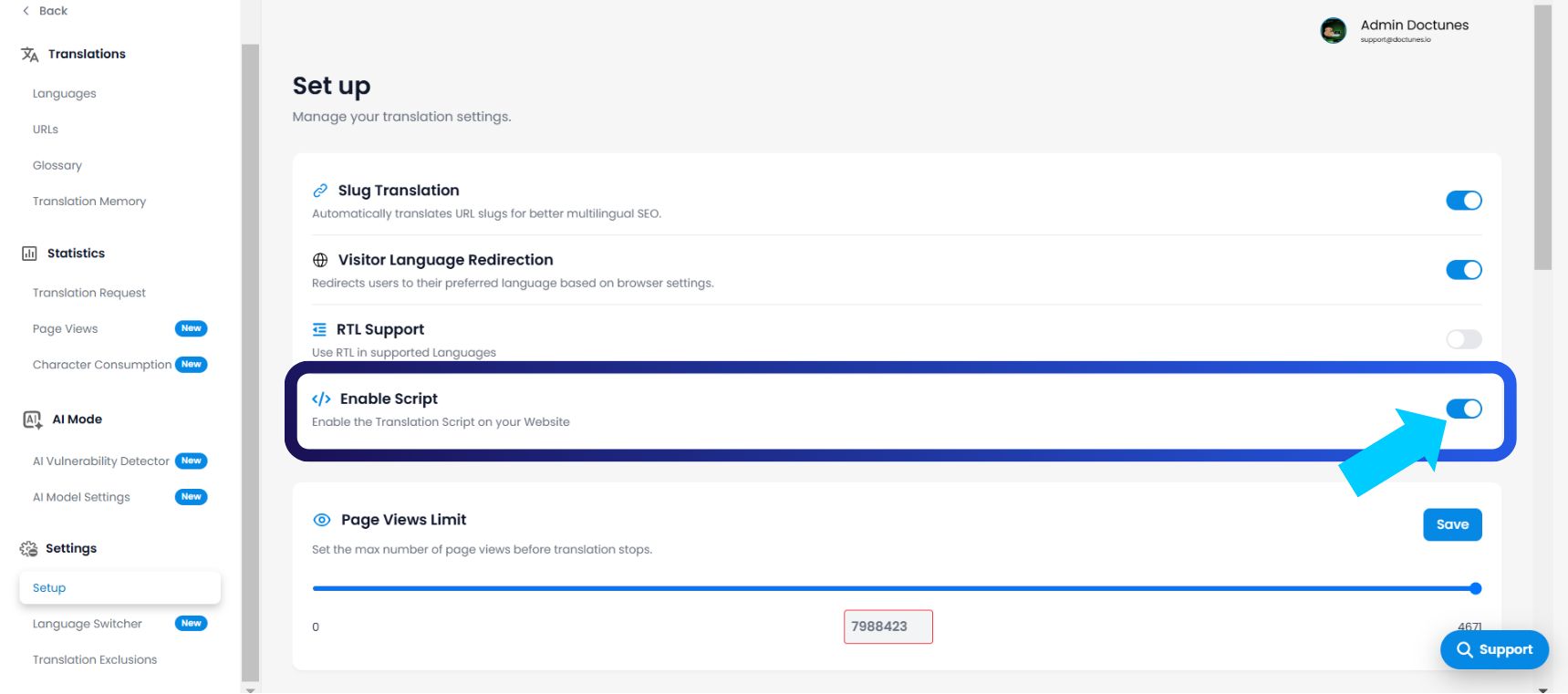
Step 3: Access Setup Configuration
In the left panel, locate the Settings section.
Click on Setup.
Step 4: Toggle State
Scroll to find the toggle labeled Enable Script.
Action: Flip the switch ON or OFF.
Latency: The change propagates immediately to the edge.
3. Operational Use Cases
When to pull the plug.
Why would you disable a service you paid for? This feature is critical for DevOps and Budgeting workflows:
Staging & Redesign: If you are deploying a major code update to your main site, disable the script to prevent the translation engine from trying to translate broken or half-finished HTML structures.
Quota Defense: If you are approaching your plan's limit (e.g., 98% of Page Views used) and don't want to upgrade yet, disable the script to prevent overage charges until the next billing cycle.
Stealth Mode (Pre-Launch): You can keep the script disabled while your team manually reviews translations in the dashboard. Once the quality assurance pass is complete, flip the switch to go live.
4. Technical Nuances
Understanding the implications.
Data Persistence: Disabling the script is non-destructive. It does not delete your Translation Memory, Glossary, or project settings. Your data remains frozen until you re-enable the service.
Project Scoping: This is a project-level setting. Disabling the script on "Site A" does not affect the live status of "Site B."
Custom Proxies: For enterprise users running manual proxy integrations, disabling this toggle prevents "Double Injection" conflicts during debugging.