How to Enable Page Views Limit & Words Limit in MultiLipi
 MultiLipi
•
Jul. 7, 2025
•
5 Min read
MultiLipi
•
Jul. 7, 2025
•
5 Min read
Manage and control your usage credits for translations and page views with clear, customizable limits.
What Are These Limits?
Your MultiLipi subscription includes an allowance of:
✅ Page Views Credits – the total number of translated page loads your site can serve within your billing period.
✅ Words Credits – the maximum number of words that can be translated and displayed.
The Page Views Limit and Words Limit settings let you define caps for these metrics so you can better monitor and control consumption.
Why Use These Limits?
Setting limits helps you:
✅ Avoid unexpected overages if traffic suddenly spikes.
✅ Pause or throttle translations when you hit a specific threshold.
✅ Align usage with your monthly or annual budget.
✅ Keep transparency and predictability in your costs.
How It Works
Page Views Limit
This is the maximum number of page view credits allowed. When the limit is reached, MultiLipi will stop serving translated pages to additional visitors until your credits are reset or increased.
Words Limit
This is the total number of words you can have translated. When the limit is reached, no new translations will be generated (already translated content remains accessible).
How to Set Your Limits
Follow these steps to adjust limits:
1️⃣ Log in to your MultiLipi Dashboard.
2️⃣ Go to Settings >Setup.
3️⃣ Use the sliders to set your preferred limits for Page Views and Words.
4️⃣ Alternatively, enter an exact number into the input box.
5️⃣ Click Save to apply your changes.
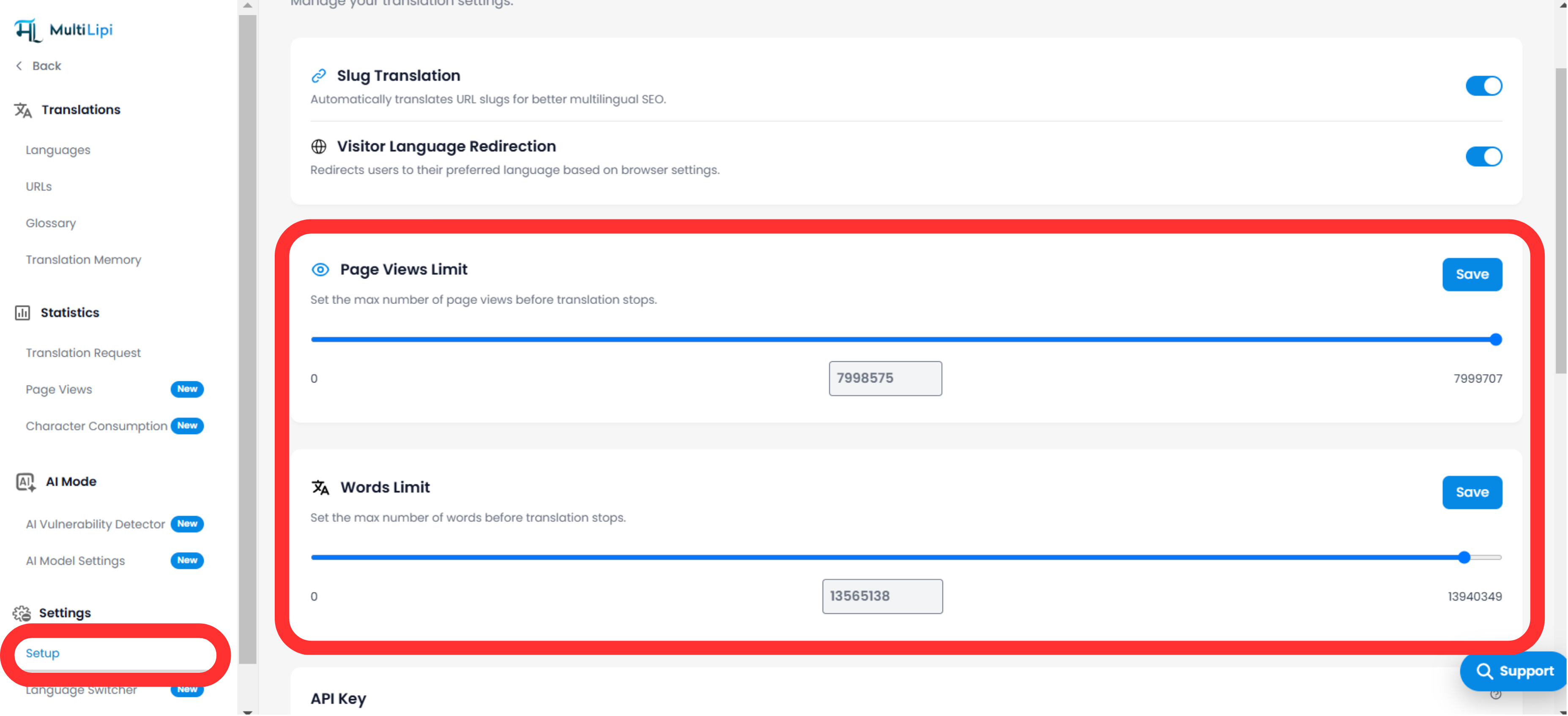
Tip: You can click Reset anytime to clear your limits and start fresh.
Notes & Best Practices
-
Monitoring: You’ll see usage stats in your dashboard to track progress against your set limits.
-
Notifications: MultiLipi can notify you when you approach or exceed your limits, so you can take action.
-
Flexibility: You can adjust limits up or down at any time.
- Impact: Reaching your limit will temporarily suspend new translations or additional translated page views.
Example Use Cases
-
Set a Page Views Limit to match your plan (e.g., 50,000 per month) so you never exceed included credits.
-
Use Words Limit to prevent translating large archives of content until you review costs.
-
Temporarily reduce limits during low-traffic periods.
Comments