How to Enable Visitor Language Redirector in MultiLipi
 MultiLipi
•
Jul. 7, 2025
•
5 Min read
MultiLipi
•
Jul. 7, 2025
•
5 Min read
Automatically redirect visitors to the most relevant language version of your website based on their browser preferences.
What Is the Visitor Language Redirector?
The Visitor Language Redirector feature in MultiLipi detects a user’s preferred language setting in their web browser and automatically sends them to the corresponding translated version of your site.
This ensures that new and returning visitors always see your content in the language they’re most comfortable with—without needing to manually pick it themselves.
Why Use It?
Enabling automatic redirection offers several benefits:
✅ Better User Experience – Visitors instantly see the right language version, reducing friction and confusion.
✅ Higher Engagement – Content in a user’s native language increases time on site and conversion rates.
✅ SEO Best Practices – Language-specific URLs help search engines index localized content more accurately.
How It Works
When enabled:
- MultiLipi looks at each visitor’s Accept-Language HTTP header (which browsers send automatically).
- It compares the preferred language to your site’s available translations.
- If a match exists, the user is redirected to the relevant version (e.g., /fr/ for French).
- If no match is found, the visitor stays on your default language page.
How to Enable Visitor Language Redirector
Follow these simple steps:
1️⃣ Log in to your MultiLipi dashboard.
2️⃣ Navigate to Settings > Setup.
3️⃣ Find Visitor Language Redirector in the list of features.
4️⃣ Toggle the switch to ON.
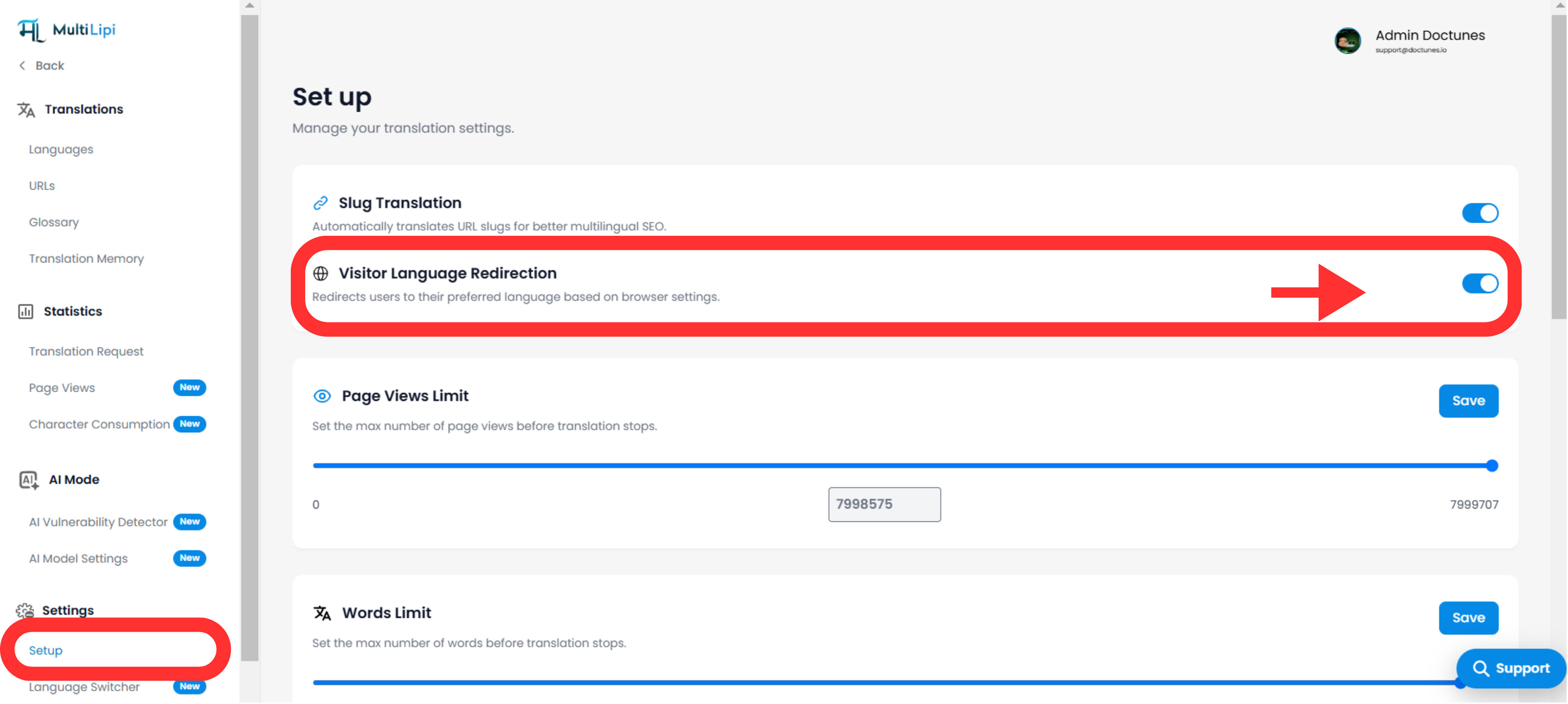
That’s it—your site is now ready to automatically serve the best language version to every visitor.
Notes & Best Practices
-
Fallback behavior: If a user’s preferred language isn’t available, MultiLipi keeps them on your default language site (e.g., English).
- SEO considerations: This feature works seamlessly with hreflang tags, so Google and other search engines will index the proper versions without duplicate content issues.
- Manual switching: Users can still manually change language if they prefer another version—MultiLipi remembers their selection for future visits.
- Testing: Use your browser’s language settings to test the redirection (e.g., set your browser language to French and visit your homepage).
Tip
Enabling Visitor Language Redirector is especially helpful if your audience comes from many regions and you want to show them the right content without extra clicks.
Need help configuring this?
Contact Support or visit the MultiLipi Help Center for additional guidance.
Comments