RTL Support in MultiLipi
 MultiLipi
•
Dec. 9, 2025
•
5 Min read
MultiLipi
•
Dec. 9, 2025
•
5 Min read
What is RTL Support?
RTL (Right-To-Left) Support allows your translated website to correctly display languages written from right to left—such as Arabic, Hebrew, Persian, and Urdu. Without RTL support, even if your text is translated, the alignment and direction may appear broken or unnatural.
With MultiLipi, enabling RTL ensures that your entire site—layout, text alignment, and direction—is adjusted for RTL languages automatically, providing a seamless experience to your users in those languages.
Which languages need RTL support?
MultiLipi automatically detects and applies RTL formatting for the following supported languages:
- Arabic (ar)
- Hebrew (he)
- Persian (fa)
- Urdu (ur)
If your website includes any of these, it’s highly recommended to enable this setting.
How to Enable RTL Support
Follow these steps to enable RTL for your MultiLipi project:
Step 1: Log in to your Dashboard
Visit dashboard.multilipi.com and log in with your account credentials.
Step 2: Select Your Project
From the left sidebar, choose the website or project where you want to enable RTL.
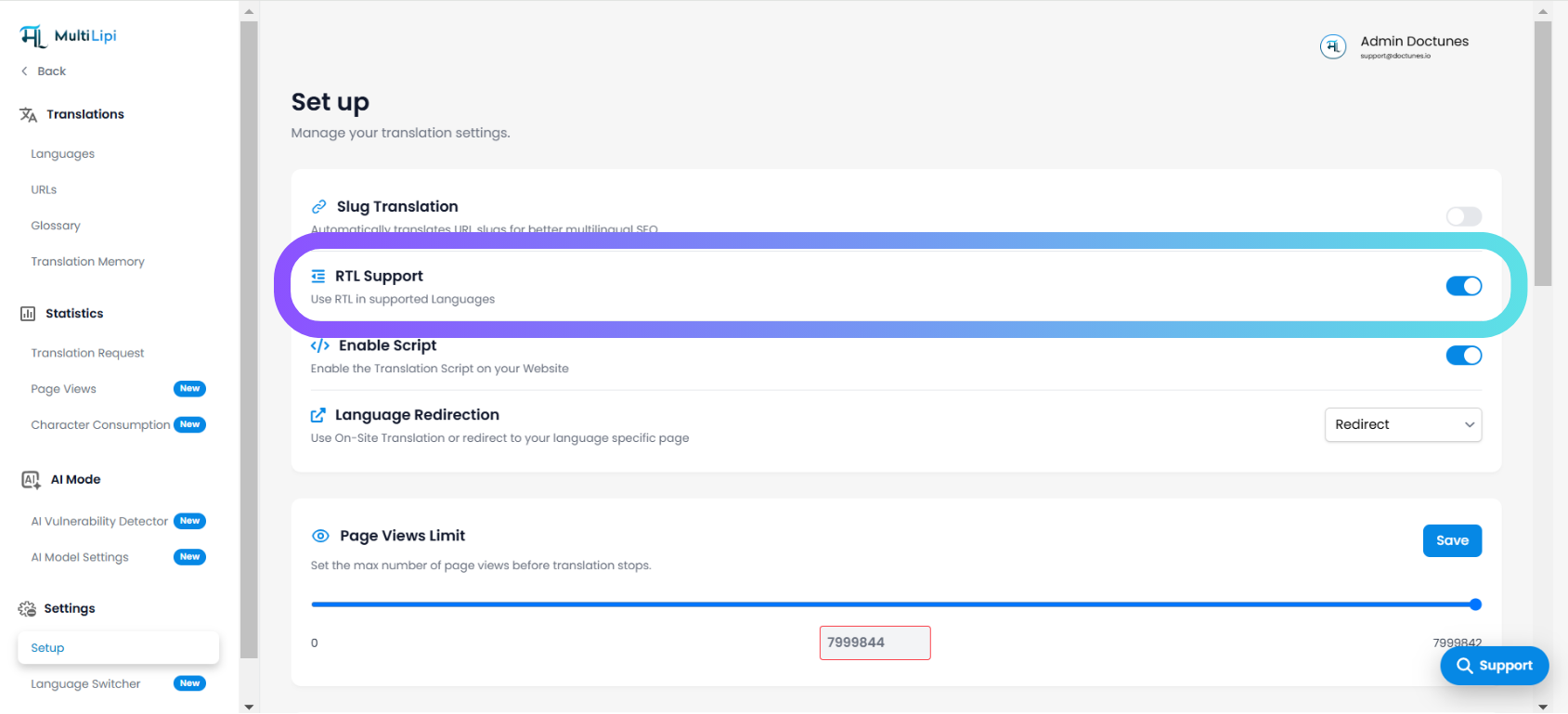
Step 3: Go to Setup
In the sidebar, scroll down to Settings and click on Setup.
Step 4: Enable RTL Support
Find the RTL Support toggle. Click to turn it ON (it will turn blue).
This ensures that your website’s layout adjusts properly for RTL languages.
Step 5: Save Changes (If Required)
Most changes are saved automatically, but ensure the toggle remains active.
Notes:
- RTL will apply only to languages that require it.
- You do not need to manually add any CSS for RTL adjustments—MultiLipi handles it dynamically.
Bonus: Use with Language Switcher
If you are using MultiLipi’s Language Switcher, RTL support ensures that when a user switches to Arabic or Hebrew, the site direction and design flip accordingly. You don’t need any frontend modification.
If you still face issues with text alignment in RTL languages, feel free to reach out via the Support button in your dashboard.
Comments